

title: API Reference
language_tabs: - python - shell
toc_footers: - Sign Up for a Developer Key
includes: - paymenttypes - accounttypes - tendertypes - requeststatuses - responsetypes - errors - response_errors
search: true
About this Documentation
As such it is a work in progress and may be incomplete or incorrect in some areas. If you find anything that you feel may be incorrect or incomplete please contact Ezidebit and we will endeavour to improve this documentation and resolve any issues you may have.
eftpos-support@ezidebit.com.au
This document is intended to be used by software developers working for integrators with the responsibility of integrating this API into their application to provide the ability to manage an EFTPOS terminal.
The only endpoints currently supported are Tender and Request. Other endpoints are included so that you can become familiar with the final state of the API but they are not be used until we announce they are available.
Introduction
Welcome to the Ezidebit EFTPOS API.
The Ezidebit EFTPOS API is an easy to use API that allows you to integrate EFTPOS functionality directly into your application.
Enabling your users to:
- Process transactions at the POS
- Increase accuracy at the POS
- Increase the speed and throughput of your POS transactions
- Remove the need to rekey sales on the terminal
- Improve reconciliation
- Consolidate settlements with other Ezidebit payment channels
The Ezidebit EFTPOS API is an asynchronous API as a PinPad transaction may span several seconds and potentially more than one minute (a consumer may take some time to find and present a card). This means that there is both a request process (with an immediate response) and a separate response (via webhooks) to report the result of a request or progress during a request.
Your integration should expect to receive responses at any time and process them as required. The default method for returning responses to your application is HTTPS Webhooks. See Responses for more information.
Getting Started
Don’t have a Developer Account? .. get started now
Ezidebit EFTPOS API endpoints are hosted at the following base URL’s, you should use the Sandbox environment while developing and testing and the Production environment when your customers are using EFTPOS with a production terminal.
| Environment | Base URL |
|---|---|
| Production | https://eftpos.ezidebit.com.au/api |
| Sandbox | https://eftpos.demo.ezidebit.com.au/api |
For example, the tender API’s full endpoint in production is:
https://eftpos.ezidebit.com.au/api/tender
All requests should be passed with the header:
Content-Type: application/json
otherwise, HTTP 415 error code will be returned. We currently only support JSON, other formats may be supported in the future.
To be able to connect to the EFTPOS platform you will need to provide some information to identify the business and the terminal that is being integrated.
Each terminal will have its own unique Terminal ID (TID) that will identify each individual terminal that is to be integrated.
| Term | Description |
|---|---|
| Terminal Id | A terminal Id is a unique value that identifies the terminal that is being integrated. If a business location has more than one terminal they will have a terminal id for each terminal. Terminal Id’s will be supplied with the terminal when they are delivered to the business and you will receive a virtual terminal id with your developer account for testing. |
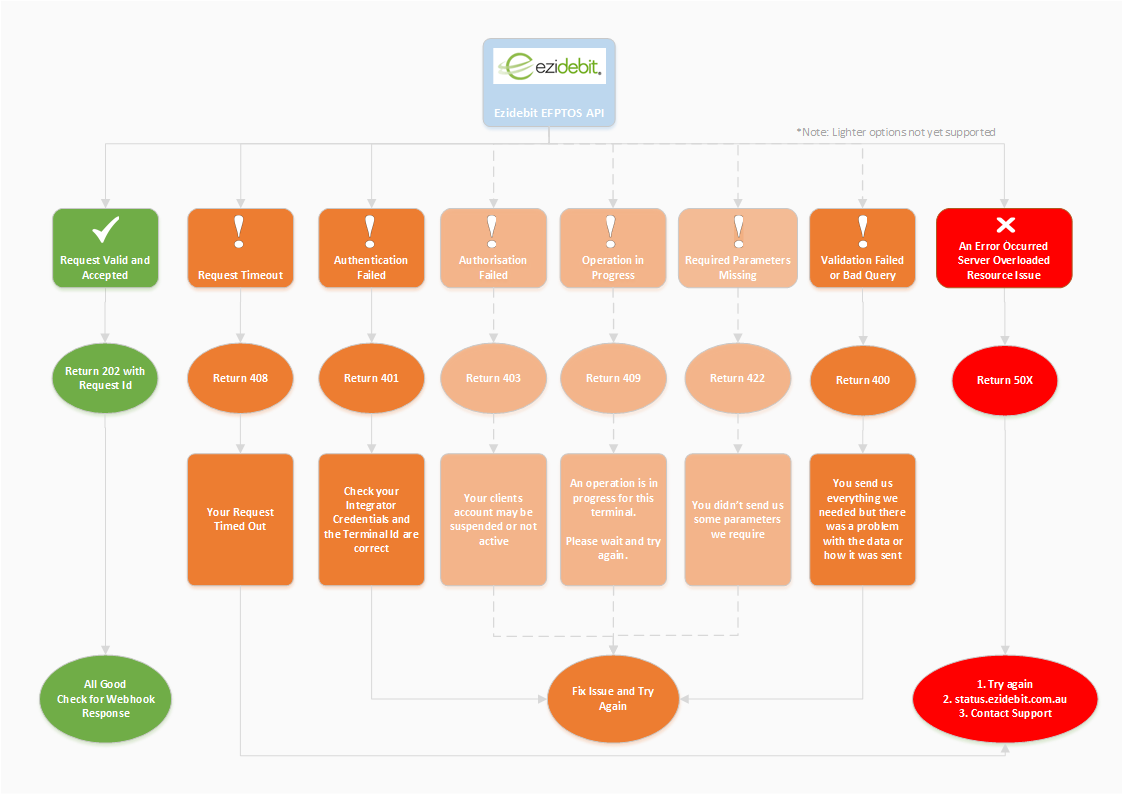
The following diagram shows a high-level overview of the API Request Process and some error conditions that may occur.
Security
To ensure the security of your payment data the API can only be called over HTTPS and will only support TLS 1.2 or greater so if your client does not support TLS 1.2 you will need to upgrade your browser or client.
We recommend that you apply some security measures when you process our response webhooks to ensure they are legitimate responses from Ezidebit. See Webhook Security.
IP-Based Access Control
The Ezidebit API will apply access control to all requests where the credentials used (Integrator API Key and TerminalId) are used from more than 1 IP address and access is interleaved (accessed from one IP .. then another .. and then back to the original IP).
To accommodate for the ability for the IP to change the process will work as follows:
- We will record the IP associated with each request against the API Key and Terminal Id used.
- If a different IP is received for a credentials pair the request will be allowed.
- If the original IP is received again then further requests with different IP’s to the original will be blocked and you will be notified of the issue.
The block will be removed after 1 hour and if the situation occurs again it will again be blocked for 1 hour. Ezidebit support will also be able to remove the block if required.
Authentication
To access the Ezidebit EFTPOS API you will need an API key which you can get by registering on our Developer Portal.
Once you have your API key you will need to include it in all calls you make to the EFTPOS API in an Authorization header.
The API uses Basic Authentication where you pass your api_key as the username and there is no password.
Please consult the documentation on your http client on how best to implement basic authentication.
Handling Responses
See the Responses section for more information.
We support Webhooks or Polling for getting responses to asynchronous API calls. Webhooks are our preferred option but if your environment does not support this then you can poll for responses using the Request endpoint.
Testing
Before your integration can be certified and released you should test your integration in the Sandbox environment with our Virtual Terminal.
Virtual Terminal
A virtual terminal allows you to test your integration without the need for a physical terminal to connect to. This allows you to get started with your integration immediately. You can complete most of your integration against a virtual terminal.
When you create your account we will automatically create credentials for you to use your virtual terminal.
When working with a virtual terminal your transactions will settle through the sandbox backend.
To use the virtual terminals send your virtual credentials to the API.
Certification
Before you can use your integration for live transactions it will have to be certified by Ezidebit. Once you have developed and tested your application please contact integrations to book in your certification.
The certification process will take a few weeks.
Versions
All calls to the API are against the latest version by default.
If you would like to specify a particular version of the API then please provide a version header to select the version of the API you would like to use.
Api-version: <VERSION>
You can also set your default version in your developer portal and this version will be used for all calls you make.
RequestId
Every request will be assigned a unique Request Id and will be returned in a response header.
Ezidebit-RequestId: <RequestId>
The RequestId is generated and returned on every request you make to the API (including requests that generate errors).
This RequestId will be returned in every response for the request and can be used at any time to query the status of a request and retrieve every response that occurred that originated from that request.
Response Idempotency
We will endeavour to deliver each webhook response once only (once you acknowledge it). If you would like to ensure your event processing is fully idempotent you can also manage a list of processed events and ensure you do not processed already logged events.
Transaction Control
The Ezidebit API automatically manages contention for a payment terminal for you and will apply restrictions on access for long running requests. Most operations are atomic and if they are accepted by the API (202) then they are processed without locking access to the terminal.
Ezidebit uses 2 different timeout periods to help you manage transactions, these are:
| Timeout | Default (seconds) | Notes |
|---|---|---|
| Short Timeout | 20 | This timeout is used for operations that require no human intervention and should complete quickly |
| Long Timeout | 60 | This timeout is used for operations involving human interaction and the time to complete can be variable and delayed. It is important to set a reasonable timeout that allows reasonable time for operations to complete. |
Timeouts are reset on each interaction, so a transaction that includes multiple steps may not timeout even if the total time runs longer than the default timeout.
Each endpoint provides the following Transaction Control. When access is blocked no other requests will be processed until the transaction completes, is canceled or times out.
| Endpoint | Timeout | Blocks Access |
|---|---|---|
| Status | Short | No |
| Tender | Long | Yes |
| Cancel | Short | No |
| Short | No | |
| Manual | Short | No |
| Settle | Long | Yes |
| Respond | Short | No |
When a transaction times out it will be cleared. If you call an endpoint while a transaction is in progress you will receive a 409 Conflict response.
Pair
Pair with PinPad.
Initiates trust relationshiop between Api and a PinPad.
Below is an example of how a typical pairing would flow. This transaction involves a pairing initiated from a client or Browser and response to be sent back synchronously. User needs to verify the match on the Response code and on the pinpad (By clicking Yes/No), and if so then pairing is successful. PinPad must be in a pairing state in order to accept pairing requests.
HTTP Request
GET https://eftpos.ezidebit.com.au/api/pair/terminal_id
HTTP PARAMETERS
| Parameter | Required | Description |
|---|---|---|
| terminal_id | Yes | The Ezidebit Terminal ID (ETID). |
A pair request will return one of the following status codes.
| Code | Description |
|---|---|
| 200 | The request was successfully received for processing with paring code generated for confirmation. |
| 400 | There was a problem with the request .. please check the request parameters. |
| 403 | The credentials you provided were not able to be authorised. |
| 422 | The request wasn’t processed. Most common issues: no connection with PinPad, PinPad already paired, pairing was not initiated on PinPad. |
| 500 | An error occurred while processing the request. |
Result Body
| Parameter | Description |
|---|---|
| request_id | The unique request id for the tender request. This is returned for all successful requests. |
| terminal_id | The Ezidebit Terminal ID (ETID). |
| verification_code | The code to verify against the one displayed in PinPad. |
Key rolling.
Periodically every 7 days from the last key exchange the PinPad will request a key rolling, which updates security keys on both PinPad and in EFTPOS API. PinPad will initiate 3 attempts to complete this. Key rolling is handled by EFTPOS API and will be done automatically. In the unlikely event of unsuccessful Key rolling within 3 attempts, the keys will be removed from the PinPad and Pairing process will have to be repeated.
Status
Get the status of the PinPad.
The status will automatically be returned when you first connect but you can get the status at any time by calling this endpoint.
The status endpoint will return detailed information on the status and configuration of:
| Item | Notes | Examples |
|---|---|---|
| PinPad | Information about the PinPad and any of its configuration | Serial #, MID, TID |
| Acquiring Bank Backend | If available it will return information on the status of the Banking Platform | Is connected? |
| Ezidebit Platform | Information on the Ezidebiy Platform | Version |
| PinPad Capabilites | Eg. which API’s does the Platfom support for the EFTPOS partner associated with the Pinpad | Does not support Cancel or Void |
| Integrator | The integrator associated with the current terminal | Integrator Name |
REQUEST
GET https://eftpos.ezidebit.com.au/api/status
HTTP PARAMETERS
| Parameter | Required | Description |
|---|---|---|
| terminal_id | Yes | The Ezidebit Terminal ID (ETID). |
| webhook_url | Yes | The URL where webhooks are to be sent for this request. If not specified then your default will be used. |
RESPONSE
This endpoint is asynchronous please check for a webhook response.
| Code | Description |
|---|---|
| 202 | The request was successfully received for processing and processing is underway. |
| 400 | There was a problem with the request .. please check the request parameters. |
| 403 | The credentials you provided were not able to be authorised. |
| 500 | An error occurred while processing the request. |
Webhook Response
StatusResponse
| Parameter | Description |
|---|---|
| event_type | The event type this response is for. This will be set to STATUS. |
| request_id | The RequestId corresponding to the original request that leads to this response. |
| terminal_id | The Ezidebit Terminal Id where the status is for. |
| status | An indication of whether the EFTPOS platform is active and available to successfully process a transaction. This will either be ACTIVE or INACTIVE. |
| data | json data containing status information for the pinpad and other parts of the eftpos platform. |
Tender
Tender an amount (Sale).
Start a sale on the PinPad for a specified amount.
Note: does not currently support cash out this will be added in a future update to the API.*
# With shell, you can just pass the correct header with each request
curl "https://eftpos.ezidebit.com.au/api/tender"
  -H "Authorization: <API KEY>"
{
  "TerminalId":"EZI-EFTPOC-003",
  "Command":"TenderResponse",
  "ResponseBody":{
    "Data":"",
    "Success":true,
    "ErrorMessage":"OK"
  }
}
import requests

# tender $20.00 on the PinPad

tender_body = {
  "terminal_id": "EZI100233",
  "amount": "2000"
}

requests.post("https://eftpos.ezidebit.com.au/api/tender", body=tender_body, headers={"Authorization": "<API KEY>"})
{
  "TerminalId":"EZI-EFTPOC-003",
  "Command":"TenderResponse",
  "ResponseBody":{
    "Data":"",
    "Success":true,
    "ErrorMessage":"OK"
  }
}
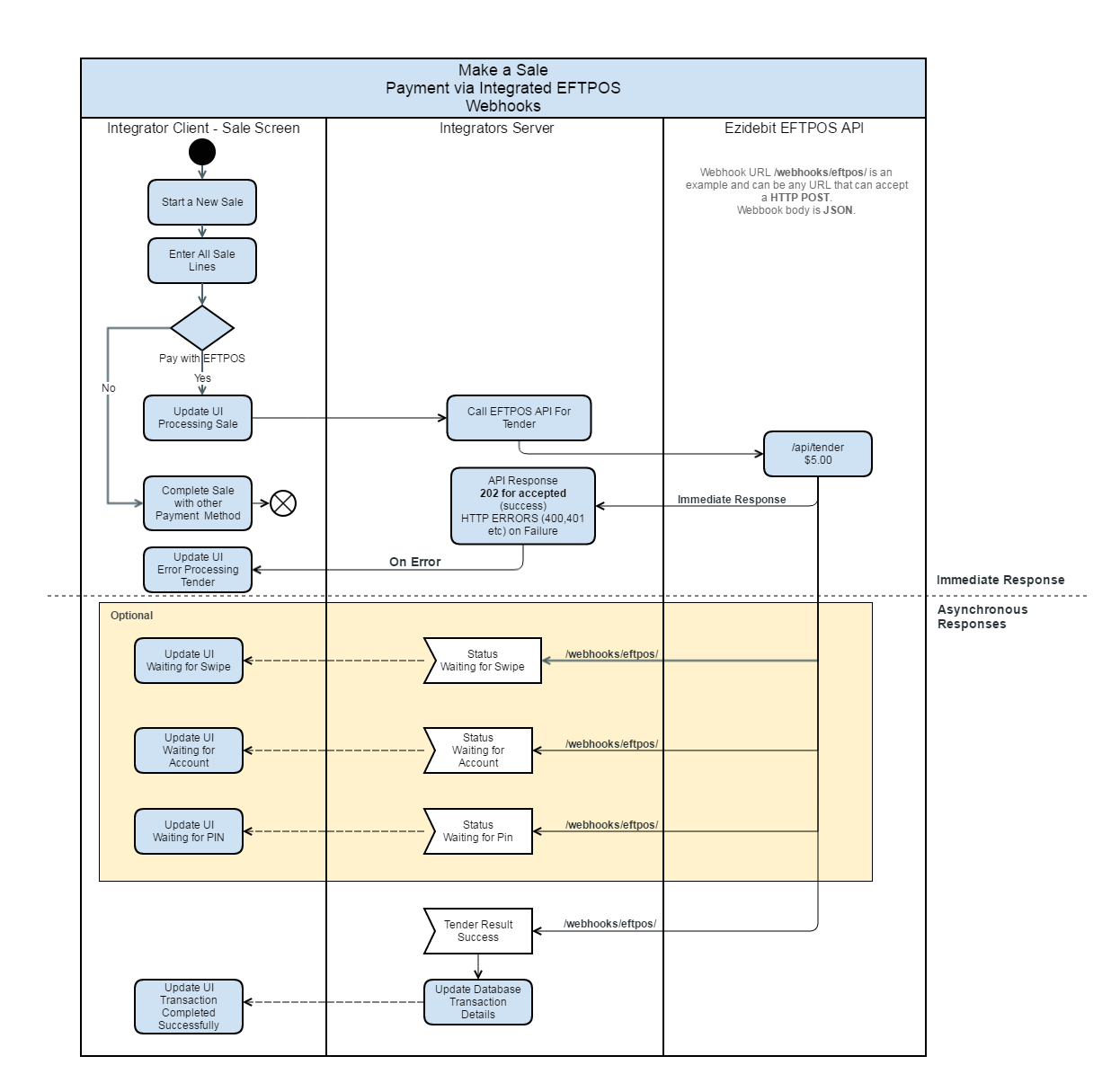
Below is an example of how a typical tender transaction would flow. This transaction involves a sale initiated from a client, causing the API to be called from the server and webhook responses to be handled via the server.
HTTP Request
POST https://eftpos.ezidebit.com.au/api/tender
POST Body
| Parameter | Required | Description |
|---|---|---|
| terminal_id | Yes | The Ezidebit Terminal ID (ETID). |
| webhook_url | Yes | The URL where webhooks are to be sent for this request. If not specified then your default will be used. |
| amount | Yes | The amount to be tendered in cents. Eg. $12.50 = 1250. |
| cashout_amount | No | The amount of Cash Out with the transaction. Eg. $12.50 = 12.50. Not currently supported |
| payment_type | No | The payment type that the tender is for (if known in advance). This is not currently supported. |
| reference | No | Your payment reference. This can be up to 16 characters and can be any printable ASCII characters. |
| transaction_type | No | The type of transaction to perform. If this is not specified then ‘Purchase’ is used. |
A tender request will return one of the following status codes.
| Code | Description |
|---|---|
| 202 | The request was successfully received for processing and processing is underway. |
| 400 | There was a problem with the request .. please check the request parameters. |
| 403 | The credentials you provided were not able to be authorised. |
| 409 | A transaction is already in progress and this request cannot be accepted. Either cancel the transaction or wait for it to complete or timeout. |
| 500 | An error occurred while processing the request. |
Result Body
| Parameter | Description |
|---|---|
| request_id | The unique request id for the tender request. This is returned for all requests even failure. |
Webhook Response
The tender request may result in more than one response as Status Responses are generated throughout the Tender process. You will always receive one TenderResponse at the end of each tender.
TenderResponse
| Parameter | Description |
|---|---|
| event_type | The event type this response is for. This will be set to TENDER. |
| request_id | The RequestId corresponding to the original request that leads to this response. |
| terminal_id | The Ezidebit Terminal Id where the transaction occurred. |
| reference | The integrators supplied reference for this tender transaction (specified in the request). |
| status | The status of the tender transaction. Either SUCCESS or FAIL. |
| response_message | A message describing the status of your tender transaction. |
| error_code | The specific error code associated with the tender transaction. See Response Error codes for a full list. |
| amount | The amount of the transacton in cents. |
| amount_tip | The amount given as a tip in cents. |
| account_type | The account type used for the transaction. Please see Account Types. |
| auth_code | ????? |
| bank_date | The date that the bank???. |
| bank_time | The time that the bank???. |
| raised | When the webhook resposnse was sent as an ISO8601 datetime string. |
| customer_receipt | The content of the receipt formatted for printing. |
| masked_pan | A masked version of the PAN for the card used. |
| card_type | The card type used in the tender. See Payment Types. |
| host_response_code | The direct code returned by the bank for this tender. |
| host_response_text | The direct text response returned by the bank for this tender. |
| merchant_id | The MID for the merchant associated with the tender. |
| rrn | better description |
| stan | better description |
Refund an amount.
Start a refund transaction on the PinPad for a specified amount.
HTTP POST
POST https://eftpos.ezidebit.com.au/api/tender
POST Body
| Parameter | Required | Description |
|---|---|---|
| terminal_id | Yes | The Ezidebit Terminal ID (ETID) for the terminal to perform the refund on. |
| amount | Yes | The amount to be refunded in cents. Eg. $12.50 = 1250. |
| reference | Yes | Your payment reference, this will be returned to you at the completetion of the refund. |
| transaction_type | Yes | The transaction type refund for a refund. |
| rrn | Yes | This is the RRN returned for the originating transaction that this refund is for. This is required for a refund. |
| webhook_url | Yes | The URL where responses are to be sent for this request. If not specified then your default will be used. |
Void the previous Transaction
Voiding a transaction will remove it from t
HTTP POST
POST https://eftpos.ezidebit.com.au/api/tender
HTTP Body
| Parameter | Required | Description |
|---|---|---|
| terminal_id | Yes | The Ezidebit Terminal ID (ETID). |
| webhook_url | Yes | The URL where webhooks are to be sent for this request. If not specified then your default will be used. |
| transaction_type | Yes | The transaction code 6 to void the previous transaction. |
Cancel
Cancel the current transaction on the PinPad.
If you need to cancel the current transaction on the Pinpad you can call this endpoint. If the transaction is currently in a state that can be canceled the transaction will be canceled.
If the transaction cannot be canceled then you will need to either void or cancel the transaction once it completes.
HTTP Post
POST https://eftpos.ezidebit.com.au/api/cancel
POST Body
| Parameter | Required | Description |
|---|---|---|
| terminal_id | Yes | The Ezidebit Terminal ID (ETTD). |
| webhook_url | Yes | The URL where webhooks are to be sent for this request. If not specified then your default will be used. |
Print on the PinPad printer
Initiate a print process if the device supports printing (integrated receipt). If the device does not support integrated receipt it might return a status indicating the POS should handle printing with relevant details on the current tender.
HTTP POST
POST https://eftpos.ezidebit.com.au/api/print
HTTP Body
| Parameter | Required | Description |
|---|---|---|
| terminal_id | Yes | The Ezidebit Terminal ID (ETTD). |
| webhook_url | Yes | The URL where webhooks are to be sent for this request. If not specified then your default will be used. |
Manual
Initiate a manual transaction.
If the card will not work (swipe,tap,chip) then this tells the PinPad to allow the number to be manually entered at the request of the POS operator.
This may not be required for all terminals but this will be needed for terminals that lock down the ability to start a manual transaction at any time unless requested via software.
HTTP Post
POST https://eftpos.ezidebit.com.au/api/manual
HTTP Body
| Parameter | Required | Description |
|---|---|---|
| terminal_id | Yes | The Ezidebit Terminal ID (ETTD). |
| webhook_url | Yes | The URL where webhooks are to be sent for this request. If not specified then your default will be used. |
Settle
Settle a session on the PinPad.
This instructs the PinPad to settle the session at the current time and print a statement showing activity for this period.
HTTP Post
POST https://eftpos.ezidebit.com.au/api/settle
POST Body
| Parameter | Required | Description |
|---|---|---|
| terminal_id | Yes | The Ezidebit Terminal ID (ETTD). |
| webhook_url | Yes | The URL where webhooks are to be sent for this request. If not specified then your default will be used. |
Respond
Respond to a request from the API
Whenever the API sends you a PromptResponse we will expect a Response from you to indicate that you have received the response and how you have actioned the request.
For example, we may ask you to provide some information as part of the transaction. If you do not have that information you might have to prompt your user for the information and then pass it onto us.
You can respond by calling this endpoint with the content of your response and the associated response id.
Some responses will be mandatory.
See Prompt Response for information on how you will receive a PromptRequest webhook.
HTTP Post
POST https://eftpos.ezidebit.com.au/api/respond
POST Body
| Parameter | Required | Description |
|---|---|---|
| request_id | Yes | The request id for the transaction that is being responded to. |
| response_type | Yes | The type of response that is being responded to. |
| response_value | Yes | The value to be returned for the given response type. |
Request
The request endpoint will allow you to retrieve information on requests that are being processed or have been processed. This allows you to determine the status of a request at any time and to generate data to show your usage of the API over time.
Every request to the Ezidebit API will return a unique RequestId (even failure), this can be passed to this API to retrieve the history for that request.
Retrieve information on a request
HTTP Get
GET https://eftpos.ezidebit.com.au/api/request/<request_id>
Result Body
| Parameter | Description |
|---|---|
| request_id | The RequestId for the request. |
| status | The current status of the request. (See Request Statuses). |
| responses | A List of responses in reverse chronological order for the request at this point in time or a single response. |
Retrieve information on transactions over a time period
HTTP Get
GET https://eftpos.ezidebit.com.au/api/request
Only requests associated with the current TerminalId will be returned.
Get Parameters
| Parameter | Description |
|---|---|
| from_time | The DateTime from which requests should be returned as UTC ISO8601. |
| to_time | The DateTime to which requests should be returned as UTC ISO8601. If to_time is omitted then all requests up to the current time are returned. |
Result Body
| Parameter | Description |
|---|
Responses
The Ezidebit EFTPOS API is different to most API’s as it is Asynchronous and you will submit a request and then receive a response on a different channel for many requests. This is because of the length of time some operations may take,often up to one minute, which makes it impracticle to wait for a response.
It is also possible you will receive multiple responses for each request, this will be the case when we send you status updates on the request while it is in progress. You should process all responses but you may decide that some are not necessary for your application and you can ignore them.
Ezidebit EFTPOS currently supports Webhooks and Polling for our response channel but we may develop other channels in the future such as websockets to fit particular cases.
Our preferred option is to receive responses via webhooks, the polling option should only be used when absolutely neccessary.
Webhooks
All responses will be in the form of webhooks which will be posted to the webhook address you supplied.
You should ensure your server is able to receive POST requests on the address you supplied in a timely manner.
It is up to you to decide how you will respond to each webhook and also whether you intend to handle then at all (if you don’t remember to return the appropriate status code).
Webhook Delivery
Responses will be sent until they are successfully received or they timeout. As a typical EFTPOS transaction is short our timeouts will also be short.
To acknowledge a webhook please:
- return 200 when you have successfully processed a response
- return 418 when you do not intend to manage the response (this stops us from retrying)
If you do not respond then we will retry sending the webhook for up to 5 minutes.
Webhook Security
When you receive a response from the eizdebit EFTPOS API you should be checking to ensure these responses are coming from Ezidebit.
You can do this in 2 ways:
- Whitelist requests from Ezidebit IP’s.
- Setup a secret token and validate it on each request.
Whitelisting Ezidebit
When a request comes in you can check the request to determine the IP address of the requestor and only allow the message to be processed if it is on the whitelist.
The whitelist can be found by calling the config endpoint.
Setting your secret token
PROCESS TBA.
Something like defining a secret key on the Ezidebit Developer Portal and then setting this key on the integrators server so they can compare this value in each request .. key sent as some sort of header …
Note: Please use a random string with a high degree of entropy for the secret key.
Note: Don’t store this secret in an insecure location (including your source code), anyone with this secret can effectively send fake data posing as Ezidebit.
Rate Limiting Replies
One way your infrastructure can be attacked is via a Denial of Service (DOS) attack and the endpoint you provide to handle webhooks can also be attacked. You should apply your rate limiting policy to your webhook endpoints as well and if you are not rate limiting you should consider rate limiting your endpoints.
Please allow for a reasonable number of connections.
Polling
For integrators who cannot support webhooks we support (but do not recommend) polling via the Request endpoint. Each request will return a RequestId and this can be used to determine the status of that request.
When polling you should immediately enter a loop after making the initial request and then check for status often enough to be able to provide a responsive experience to the user. We recommend polling every 500ms, this can be lower but we will only support 200ms and above.
Remember to handle the case where a response is not provided and include appropriate timeouts. When using timeouts remember to reset the timeout after each response that is not a tender response (eg. a status response).
If a request has not generated any responses yet you will receive a 404 error for the request_id. If you receive an 404 error you should continue to poll until you reach the point you have decided to timeout the operation.
Response Structure
Each webhook response will contain different information but each response will contain some common information that you can use to help you decide on how best to process a response.
Common response elements are:
| Field | Description |
|---|---|
| response_type | Reference the Response Type list for a list of all response types and their codes |
| response_time | The date and time the webhook was raised on the server. This DateTime is UTC RFC3339 format. |
| terminal_id | The Ezidebit terminal id the response is for. |
| user_client_id | A user-defined identifier for the client that is associated with the response. This value can be passed in via the request and passed on via the webhook to help in determining which client the response should be delivered to. |
| status_code | A general status code for the operation. |
| attempt_number | The current attempt number for this webhook response. For the first try, this will be set to 1 and each subsequent attempt will increment this number. |
| process_time | The number of milliseconds since the request that lead to this response was received. This is useful for understanding the time it takes to process payments. |
In addition to the common response elements, there will be a specific set of responses for each response type listed below.
Response Types
You can expect to receive webhooks with these response types, you can decide which are appropriate for your application and process only those.
| Type | Notes |
|---|---|
| tender_response | This response occurs when a sale has been completed. This response will be sent in all cases regardless of the outcome of the sale. |
| refund_response | This response occurs when a refund has been completed. This response will be sent in all cases regardless ofthe outcome of the refund. |
| timeout | An operation timed out and is now considered abandoned. Any subsequent activity will be considered part of a new transaction. |
| status_response | A response to a requested status or an updated on the current status of the current operation. Many operations will return a status_response rather than a specific response to the request. |
| response_request | A request by the API to provide some information. This action is usually initiated by the payment terminal and should only be required in certain conditions. |
Tender & Refund Response Data
A tender response will include the following additional fields.
| Field | Desciption |
|---|---|
| account_type | |
| amount | The amount originally tendered and charged (if successful) (In cents). |
| amount_purchase | The amount of he transaction that was purchases (in cents). |
| amount_tip | the amount of any tip given as part of the transaction (in cents). |
| auth_code | The 'Authorisation Code’ returned by the Host. |
| bank_date | The date the financial transaction occured on. Format is DDMMYYY. |
| bank_time | The time the financial transaction occured on. Format is HHMMSS. |
| customer_receipt | The customer receipt formatted to be printed. This can be sent to a printer or receipt printer for printing. |
| card_type | |
| cash_out | The cash out amount in cents. Note not currently supported. |
| error_code | |
| event_type | REFUND for a refund. You should check this field to determine when a refund has been completed. |
| host_response_code | The response code returned by the host for the refund. |
| host_response_text | A text description of the resposne returned for the refund. |
| masked_pan | The Primary Account Number (PAN) for the card that was used in this refund. The PAN is masked and will only include the last 4 digits. |
| merchant_id | |
| raised | When the refund was originally raised on the Ezidebit EFTPOS platform. Format is an ISO8601 datetime. |
| reference | The reference you provided when you initiated this refund. Use this field to identify the refund in your system. |
| request_id | An ezidebit assigned unique identifier for the refund transaction. |
| response_message | |
| rrn | The Retrieval Reference Number (RRN) for the refund. |
| stan | The Sequential Transaction Audit Number (STAN) for the refund. |
| status | |
| terminal_id | The Ezidebit terminal id where the refund transaction occured. |
| payment_type | The type of payment used if available. Please refer to payment types for definitions. |
| transaction_reference | An Ezidebit unique reference for the transaction that was processed. |
| user_transaction_reference | A unique transaction reference provided by the user and relayed in the response to help in reconciling the transaction. |
| transaction_status | The status of the transaction. See transaction statuses for valid statuses. |
| status | A message indicating the status of the transaction. This message is intended as a user readable statement of the status of the transaction that was just processed. You can either use this message in your own user interface or generate your own. |
Response_Request
| Field | Description |
|---|---|
| response_type | The type of response that is being requested. Refer to Response Types. |
| response_values | The list of valid responses for this request. eg. ['Yes’, 'No’]. |
| seconds_available | The number of seconds within which a response is required. This is governed by timeouts on the terminal and a response may need to be provided within this period for the operation to continue. |
Timeout Response Data
A timeout response returns little additional data other than responding with the timeout period that was enforced. The general status code will indicate the timeout.
| Field | Description |
|---|---|
| timeout_seconds | The timeout period that was enforced for this timeout in seconds. This is useful if you feel the timeout setting needs to be changed. |
Configuration
To be able to identify your terminal to the EFTPOS architecture you will need to provide some identifying information on some or all calls. This information will have to be configured in your application so that it is available when you make a call to the API.
You should decide the best solution for your application.
You need to store the following information for each terminal at a location and know which terminal is associated with which client.
| Field | Description |
|---|---|
| Terminal Id | This is a unique identifier indicating your terminal |
Store in configuration
You can store the values in a configuration file where they cannot be modified and can be set on install or during an update.
This makes it harder for users and technicians to make changes but your users are less likely to change a setting they shouldn’t.
Have a configuration screen
If you add a configuration screen then users and technicians can easily set and update the configuration data. If you do have a configuration screen we recommend that you lock it down so that it can only be accessed with a password as changing these settings may make your EFTPOS integration inoperable.
Data
Date Formats
All dates in the API will be strings formatted to the RFC3339 or ISO8601 specification.
JSON
All data will be exchanged as JSON data. XML and other formats are not supported.
Troubleshooting
If you are having problems accessing the API then we recommend the following tools to troubleshoot your usage of the API.
| Tool | Link | Notes |
|---|---|---|
| Curl | https://curl.haxx.se/ | A command line tool to help you call the API and see detailed information on the call. Output from curl can be submitted to our support department to help with resolving any issues. |
| Postman | https://www.getpostman.com/postman | A powerful API development platform that allows you to work with API’s in an easy to use interface. |